

Fortnite Chapter 6 Best PC Settings & How To Boost FPS
Fortnite's already frantic pace can become unbearable with poor framerates, rendering the game virtually unplayable. Fortunately, many performance issues are easily resolved by adjusting in-game settings. Let's dive into the optimal PC settings for a smoother, more enjoyable Fortnite experience.
Fortnite Best Display Settings
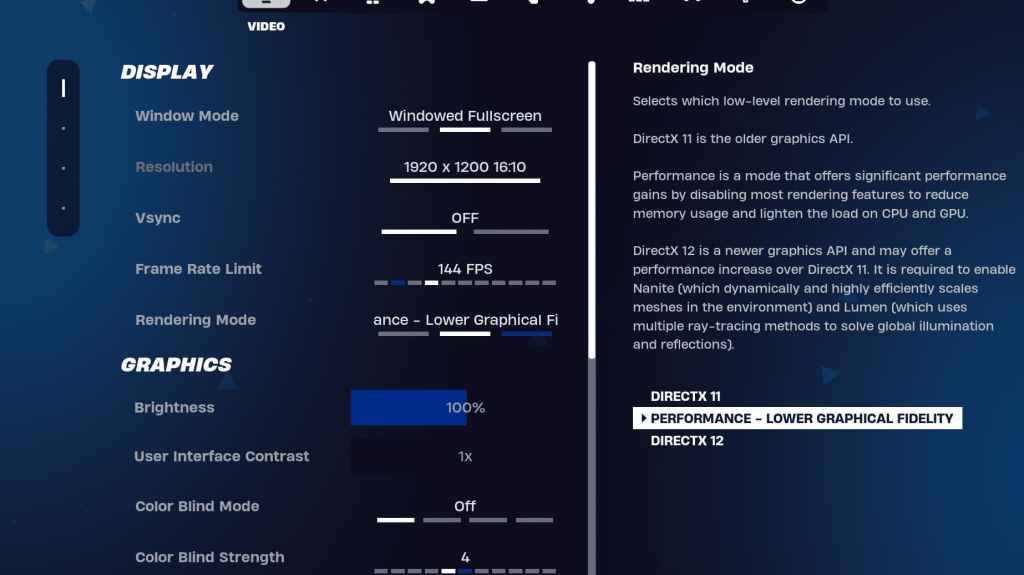
Fortnite's Video settings are divided into Display and Graphics subsections. Both significantly impact performance, so careful tweaking is crucial. Here's the recommended Display configuration:
| Setting | Recommended |
| Window Mode | Fullscreen (best performance). Windowed Fullscreen (if frequent tabbing is needed). |
| Resolution | Native monitor resolution (usually 1920x1080). Reduce for low-end PCs. |
| V-sync | Off (prevents significant input lag). |
| Framerate Limit | Monitor Refresh Rate (e.g., 144Hz, 240Hz) |
| Rendering Mode | Performance (maximizes FPS). |
Rendering Modes: Making the Right Choice
Fortnite offers three rendering modes: Performance, DirectX 11, and DirectX 12. DirectX 11, the default, is older but stable and generally performs well. DirectX 12, while newer and potentially offering performance boosts on modern systems with enhanced graphics options, may not always yield the best results. For peak performance and minimal input lag, Performance mode is the preferred choice among professionals, prioritizing FPS over visual fidelity.
Fortnite Best Graphics Settings
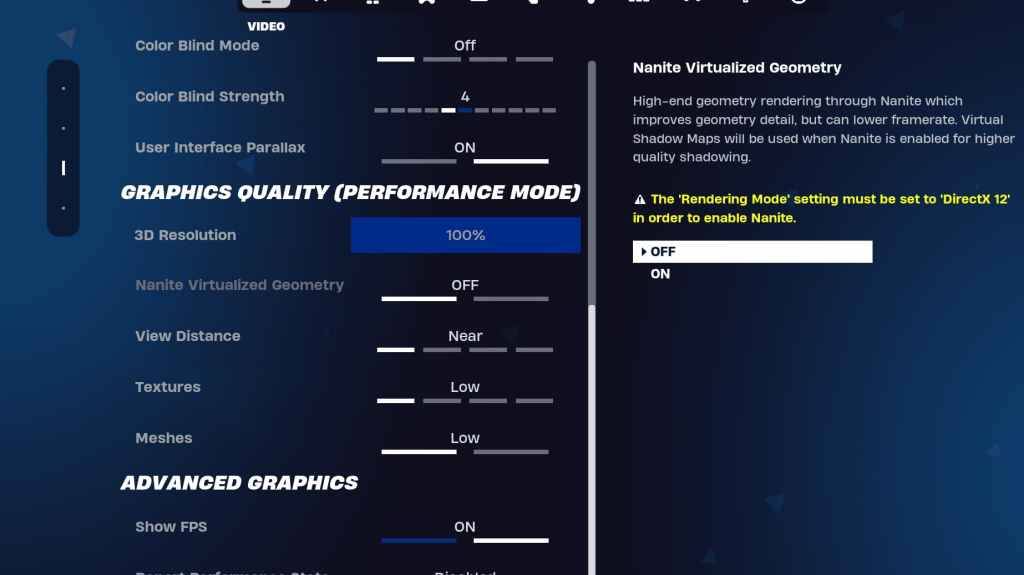
The Graphics settings offer the most significant potential for FPS gains by controlling visual fidelity. Configure these settings to minimize resource usage and maximize frame rates:
| **Setting** | **Recommended** |
| Quality Preset | Low |
| Anti-Aliasing and Super Resolution | Off |
| 3D Resolution | 100% (70-80% for low-end PCs) |
| Nanite Virtual Geometry (DX12 only) | Off |
| Shadows | Off |
| Global Illumination | Off |
| Reflections | Off |
| View Distance | Epic |
| Textures | Low |
| Effects | Low |
| Post Processing | Low |
| Hardware Ray Tracing | Off |
| Nvidia Low Latency Mode (Nvidia GPUs only) | On+Boost |
| Show FPS | On |
Fortnite Best Game Settings
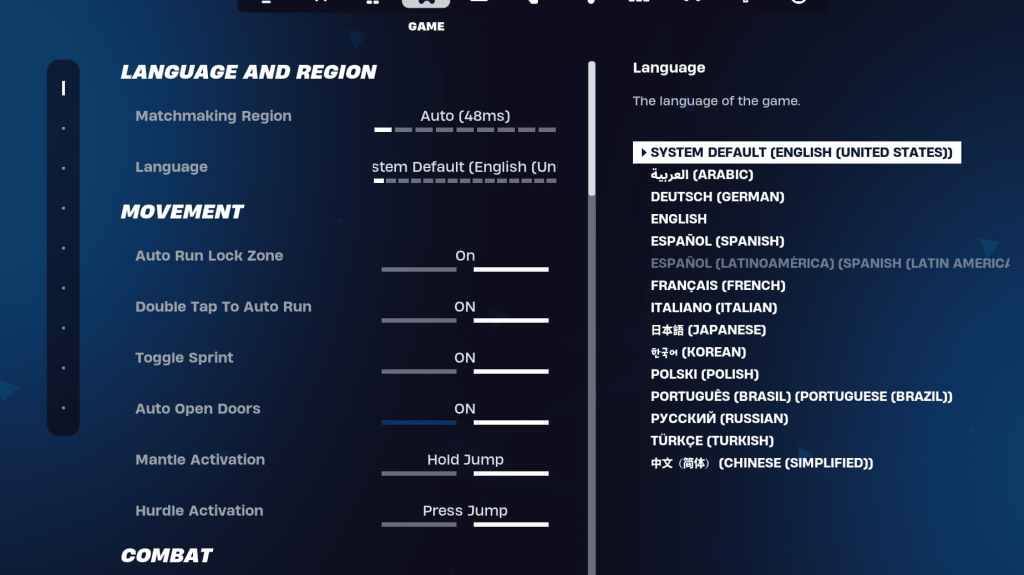
The Game settings don't directly impact FPS but are crucial for gameplay. These settings affect editing, building, and movement. While many are subjective, some are essential for optimal performance.
Movement
- Auto Open Doors: On
- Double Tap to Auto Run: On (controllers)
Other movement settings can remain at their defaults.
Combat
- Hold to Swap Pickup: On
- Toggle Targeting: Personal preference (Hold/Toggle to Scope)
- Auto Pickup Weapons: On
Building
- Reset Building Choice: Off
- Disable Pre-edit Option: Off
- Turbo Building: Off
- Auto-Confirm Edits: Personal preference
- Simple Edit: Personal preference
- Tap to Simple Edit: On (requires Simple Edit to be on)
These are the key Game settings; others are quality-of-life adjustments with minimal impact on gameplay or performance.
Fortnite Best Audio Settings
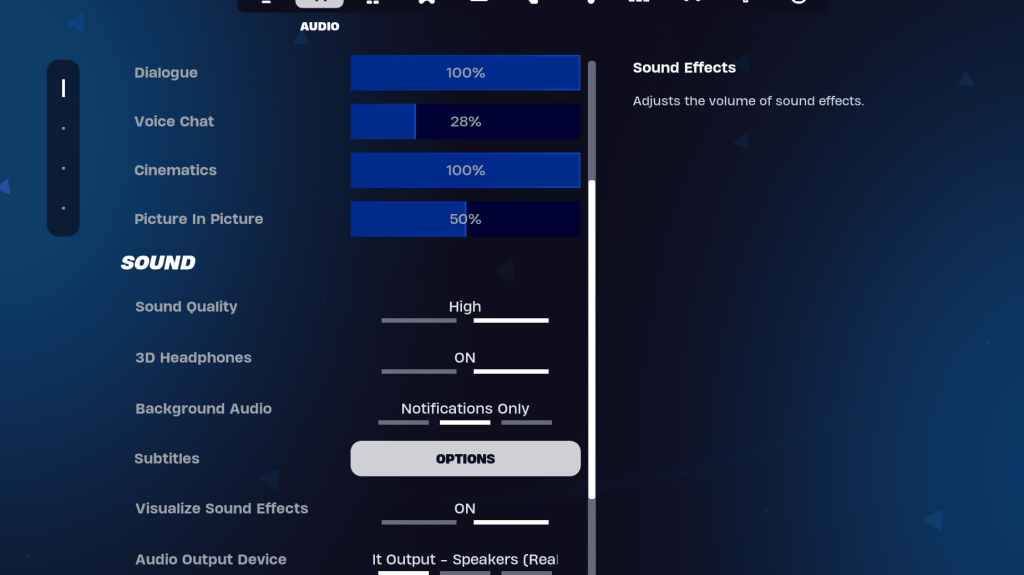
Clear audio is vital in Fortnite for detecting enemies. While the default audio settings are generally good, enabling 3D Headphones (for improved spatial audio, though results may vary depending on your headset) and Visualize Sound Effects (providing visual cues for sounds like footsteps) is recommended.
Fortnite Best Keyboard and Mouse Settings
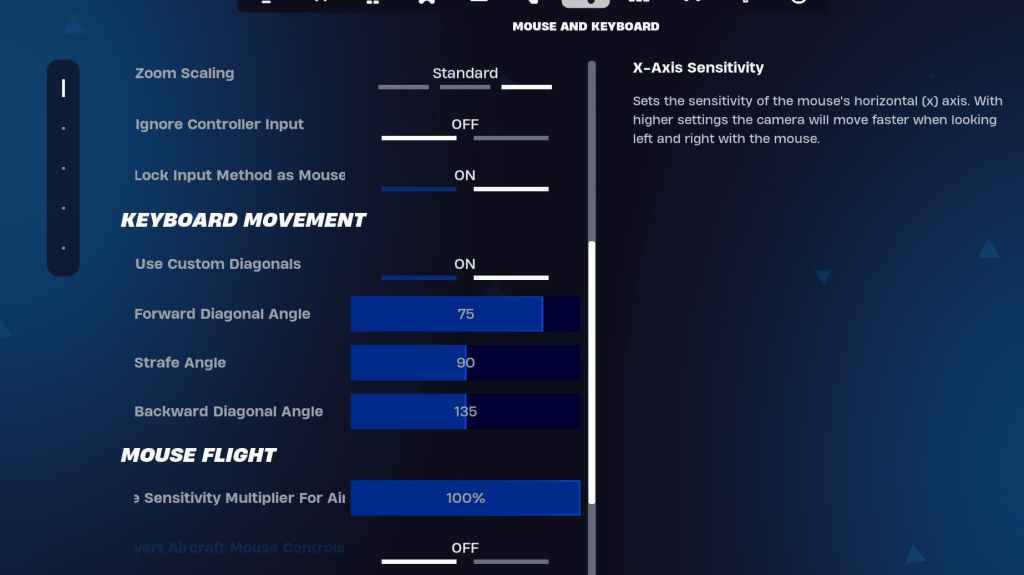
Finally, configure your Keyboard and Mouse settings for optimal control. Adjust sensitivities according to your preference:
- X/Y Sensitivity: Personal preference
- Targeting Sensitivity: 45-60%
- Scope Sensitivity: 45-60%
- Building/Editing Sensitivity: Personal preference
Keyboard Movement
- Use Custom Diagonals: On
- Forward Angle: 75-78
- Strafe Angle: 90
- Backward Angle: 135
Keybinds are highly personal; experiment with the defaults or explore alternative configurations. Consider consulting dedicated guides for optimal keybind setups.
This comprehensive guide covers the essential settings for optimizing your Fortnite experience on PC. Remember to adjust settings based on your hardware and personal preferences. Enjoy the improved gameplay!
Fortnite is available on various platforms, including Meta Quest 2 and 3.
-
 Pump with ElvieKeep up with your pumping routine effortlessly using the Pump with Elvie app. Designed as the perfect partner for your Elvie Pump or Elvie Stride, this app provides clear guided instructions, insightful articles, and customizable pumping options. Wh
 -
 언니의파우치 - 내돈내산 뷰티리뷰, 뷰티 앱테크Discover the 언니의파우치 (Sister's Pouch) beauty app where you'll not only enhance your beauty routine but also unlock easy earning opportunities. This innovative platform serves as your ultimate resource for authentic beauty reviews, engaging challenges
 -
 Claras Love HotelWelcome to Clara's Love Hotel, a luxurious sanctuary where deepest desires are fulfilled and wildest fantasies come alive. Join Clara and her alluring companions as they navigate a seductive world driven by passion, wealth, and danger. Within this p
 -
 Lazy JumpGet ready for chaos in Lazy Jump as you guide a floppy ragdoll through 300+ physics-based puzzle levels. Your character moves like a wet noodle, so quick thinking and a solid grasp of inertia are key to overcoming challenges—from scoring goals to an
 -
 Lunch with Ronan modIndulge in a provocative and intimate adventure with Lunch with Ronan, a sensual standalone spin-off from Notes of Hearts. This captivating visual novel places you in the role of Ronan's workplace colleague, uncovering a realm of passion, intimacy,
 -
 TRUE FITNESS SingaporeReady to begin your fitness journey? The True Fitness Singapore app is your perfect starting point! With convenient locations islandwide, premium facilities, and diverse class options like Yoga, Dance, and Cycling, True Fitness offers everything req




