

Best Settings for Easier Headshots in Free Fire
Free Fire, Garena's wildly popular battle royale game, delivers fast-paced, adrenaline-fueled action perfect for short, intense gaming sessions. Each match clocks in around 10 minutes, making it ideal for players on the go. Diamonds, the game's premium currency, unlock a world of customization options for characters, vehicles, and weapons. This guide explores various methods for acquiring free diamonds within the game.
What are Headshots?
In Free Fire, headshots are the ultimate power move—a single, well-placed shot can quickly eliminate an opponent, giving you a massive advantage. Mastering this skill requires a combination of optimal settings, refined techniques, and consistent practice. Your sensitivity settings directly impact your aiming speed and accuracy. The right settings significantly boost your headshot potential without resorting to cheats or third-party tools. Fine-tuning these settings enhances character movement and target tracking, crucial for those crucial headshots.
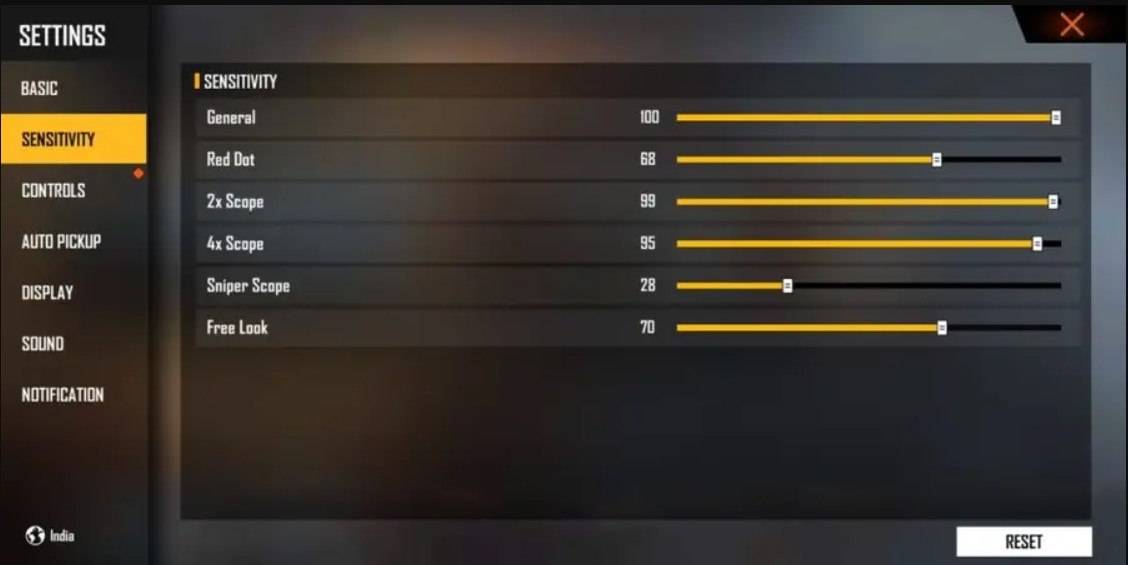
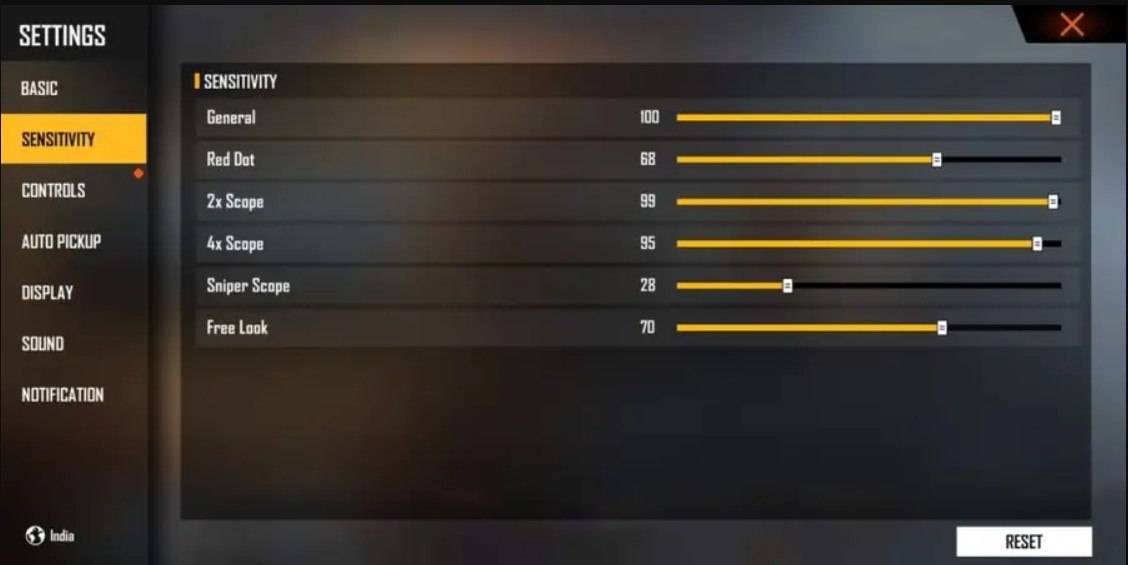
Best Sensitivity Settings for Headshots
Sensitivity settings are key to improving your aim, especially for headshots. Precise adjustments ensure smooth and accurate crosshair movement.
Recommended Settings: Aim Precision: Default; Left Fire Button: Always; Reload Progress on Crosshair: Off; Hold Fire to Scope: On; Grenade Slot: Double Slot; Vehicle Controls: Two-handed; Auto-parachute: On; Quick Weapon Switch: On; Quick Reload: Off; Run Mode: Classic; Free Look: On
Optimize your HUD Layout
Your HUD layout significantly impacts your gameplay. A personalized setup tailored to your style dramatically improves performance.
- Fire Button Placement: Position the fire button for easy thumb access without strain. Many pro players use a three- or four-finger claw grip for superior control.
- Drag Shooting: Enable drag shooting, keeping the fire button size between 50-70% for precise swiping and headshots.
- Quick Weapon Switch: Place the weapon switch button near your thumb for rapid access.
- Crouch and Jump Buttons: Position these near your movement controls for efficient crouch + shoot and jump + shoot techniques.
- Scope Button: Keep the scope button close to your index finger for quick aiming and headshot alignment.
Increase your Headshot Accuracy Using BlueStacks Tools
While mobile screens are great for navigation, a larger PC or laptop screen offers superior aiming precision. BlueStacks, with its enhanced features, significantly improves your headshot accuracy. Enjoy improved graphics, customizable keyboard controls, and smoother gameplay.
- Keyboard and Mouse Support: Map controls to your keyboard and mouse for enhanced accuracy.
- Customizable Key Mapping: Customize controls to your preference, assigning the fire button to the mouse for smoother drag shots.
- Enhanced Graphics and Performance: Experience smoother gameplay with high graphics settings without lag or overheating.
- Improved Sensitivity Settings: Fine-tune sensitivity for better control over drag shots and scoped headshots.
Experience Free Fire's enhanced gameplay on a larger screen with the precision of keyboard and mouse controls using BlueStacks!
-
 Huge Timer Stopwatch TabataMeet your ultimate timing companion: Huge Timer Stopwatch Tabata. Designed to handle all your timing tasks, from workouts and cooking to focused study sessions, this digital app masterfully combines a stopwatch and timer into one intuitive interface
 -
 CYBER RUSSIADive into Cyber Russia!Welcome to Cyber Russia! This action-RPG set in a futuristic Russia offers the perfect way to enjoy thrilling adventures with friends.Shape your own destiny and rise from nothing to greatness—your choices define your path and p
 -
 XNX-xBrowser - Vpn Bokeh FullExperience lightning-fast and secure browsing with our app, XNX-xBrowser - Vpn Bokeh Full. Forget about slow loading times and enjoy a smooth, efficient web experience. Featuring a beautiful design and a wide array of capabilities, our app is built
 -
 Words OutTest your vocabulary skills: 300 levels to complete"Words Out" is a word game that challenges your spelling and vocabulary abilitiesEASY TO PLAYArrange cards on the 4 rows of the board to create words with 3 letters or moreWhen a new word appears on
 -
 HudlBoost your team's performance with Hudl, the premier video analysis app. Coaches can effortlessly review game footage, analyze data, create exchanges, and monitor athlete activity—all in one integrated platform. Capture and upload video directly fro
 -
 Aspen Beauty Academy of LaurelGet instant access to our Salon with the brand-new AppEnjoy seamless salon access through our updated App. Book appointments, explore exclusive offers, and manage your upcoming visits.KEY FEATURES:1. Book Appointments. Schedule your visit directly fr




