


| App Name | 1C Big Keyboard |
| Developer | 1C Wearable |
| Category | Tools |
| Size | 25.89M |
| Latest Version | 1.108 |
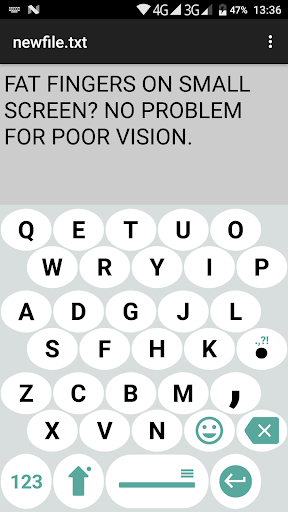
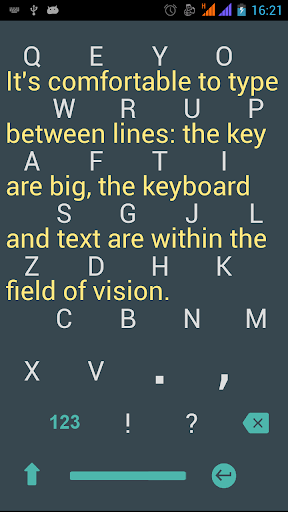
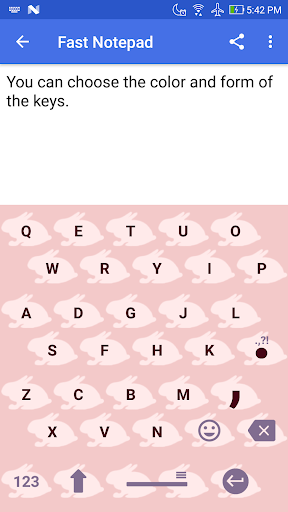


1C Big Keyboard is a virtual keyboard app optimized for Android tablets and large-screen devices, featuring an expansive layout for effortless typing. Its customizable design includes adjustable key sizes, versatile themes, and intuitive gesture controls to enhance productivity on bigger displays. Engineered for comfort and efficiency, this app redefines the typing experience for tablet users through its smart ergonomics and adaptable functionality.
Key Features of 1C Big Keyboard:
* Oversized letters and buttons to minimize eye strain and improve visibility.
* Streamlined interface with seamless language-switching capabilities.
* Sticker-friendly swipe gestures for quick phrase expressions.
* Customizable key shapes for a personalized typing experience.
* Free version packed with expressive emoticons.
My Vision Journey at 58
When I turned 58, my declining eyesight became impossible to ignore. This personal challenge motivated me to develop a keyboard solution that addresses real-world visibility needs – starting with thorough research into the daily struggles of aging users.
Designing for Larger Hands
As someone with broader fingertips, I understood the frustration of cramped keyboards. Our solution combines generous key spacing with optimized ergonomics, creating a comfortable input method for users with all hand sizes.
A Message for Younger Users
While you might not need this keyboard today with your sharp vision, consider it future-proofing – or perhaps a thoughtful upgrade for parents already experiencing these accessibility challenges in their digital lives.
Full-Screen Android Keyboard
Engineered specifically for Android, this keyboard utilizes every pixel of your screen. The 100% display coverage ensures pinpoint accuracy with every touch interaction.
Seamless Display Transitions
Effortlessly activate full-screen mode with an intuitive upward swipe, maintaining workflow continuity while maximizing your typing workspace.
Eye Comfort Innovation
Our vision-conscious design reduces ocular stress through strategic element sizing and spacing, helping maintain focus and decrease fatigue during extended typing sessions.
Precision Typing Experience
The generously spaced layout virtually eliminates typos, enabling clearer communication with significantly fewer input errors.
Ergonomic QWERTY Adaptation
We've reimagined the traditional keyboard layout with compressed spacing, creating a roomy yet efficient typing surface that accommodates larger hands without sacrificing speed.
Latest Version Updates
Version released September 9, 2024
- Enhanced landscape mode customization options.
-
 Invisible Woman Debuts in Marvel Rivals Gameplay
-
 Anime Power Tycoon Embraces Lucrative Codes for Enhanced Gameplay
-
 Fallout-Style Game Last Home Soft Launches On Android
-
 Hades 2 Warsong Update Reintroduces Ares and Brings a New Boss
-
 KFC Collaborates with Tekken for Unique Gaming Experience
-
 Roblox: Free Robux via Peroxide Codes (January 2025)