Nintendo Switch 20.0.0 Update: New Icons, System Transfer Features for Switch 2
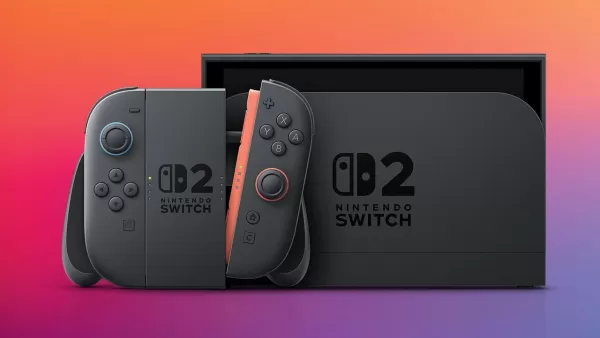
Nintendo has rolled out a firmware update for the Switch, paving the way for the upcoming Switch 2 launch.
The Nintendo Switch Firmware Update Version 20.0.0 introduces several enhancements to the eight-year-old console, aligning it with the debut of its successor, the Switch 2, set for June, according to Nintendo's official patch notes.
A key feature is the new system transfer option to the Nintendo Switch 2, now available in System Settings. This allows users to transfer data from their Switch to a Switch 2 via local communication.
For those unable to access their Switch before receiving a Switch 2, there's an option to upload transfer data to a dedicated server, which can later be retrieved on the new console.
Be aware that uploading data to the server will reset the Switch to factory settings. Nintendo advises using this option only if you can complete the transfer on the Switch 2. Otherwise, opt for local communication transfer after obtaining your Switch 2.
Some Switch users planning to sell or trade their original console for a Switch 2 are eager to use this transfer feature, as it eliminates the need to retain their old device. However, others are wary of the factory reset requirement and express concerns about potential data loss on Nintendo’s server.
Additionally, the update refreshes the design of select user icons, which the community has already showcased. Notably, Donkey Kong’s updated icon reflects the new design from upcoming Switch 2 exclusives Donkey Kong Bananza and Mario Kart World.
Some Icon Redesigns in the new Switch Update
byu/thetripp45 inNintendoSwitch
New icons for Virtual Game Cards and GameShare have also been added to the Home menu, both tailored for the Switch 2 launch.
Nintendo Switch Firmware Update Version 20.0.0 Patch Notes
Ver. 20.0.0 (Released April 29, 2025)
The following icons for new features have been added to the HOME Menu:Virtual Game CardPurchased Nintendo Switch digital software, DLC, and select free titles are now displayed as virtual game cards in a dedicated menu list.You can load or eject virtual game cards across up to two Nintendo Switch systems.Virtual game cards can be shared with others in the same Nintendo Account family group. For details, refer to the Virtual Game Card Guide.GameShareCompatible software can be shared from a Nintendo Switch 2 to nearby systems for multiplayer gaming.This feature supports local wireless only and must be initiated by the Nintendo Switch 2 system.GameShare is not available between two Nintendo Switch, Nintendo Switch – OLED Model, or Nintendo Switch Lite systems.User-Verification Settings has been added under User > User Settings.You can secure the Virtual Game Card menu by requiring a PIN or Nintendo Account sign-in.Online License Settings has been introduced.When enabled, purchased software or DLC can be played online, even without the virtual game card loaded.For more details, check the System Settings screen.The Nintendo eShop and Nintendo Switch News icon colors on the HOME Menu have been updated.Multiple save data files can now be selected and transferred simultaneously in the “Transfer Your Save Data” menu.System Transfer to Nintendo Switch 2 has been added under System Settings > System.You can transfer data from your Nintendo Switch to a Nintendo Switch 2 using local communication.For users unable to access their Nintendo Switch before receiving their Switch 2, an option allows uploading transfer data to a dedicated server for retrieval on the new console. Note that this process resets the Nintendo Switch to factory settings, so only proceed if you can complete the transfer on the Switch 2.For continued use of your Nintendo Switch until you acquire a Switch 2, perform the system transfer via local communication after obtaining the new console.An internet connection and Nintendo Account are required for both local and server-based transfer methods.For more details, see System Transfer from Nintendo Switch to Nintendo Switch 2.Some user icons have been refreshed.For in-depth information on the Nintendo Switch 2, visit the Nintendo website.
The “Primary Console” term has been replaced with “Pass-enabled console” as part of the shift to virtual game cards. On a “Pass-enabled console,” all users can access specific subscriptions or passes for certain software. For details, see How to Set or Change the Pass-Enabled Console for a Nintendo Account.
This update sets the stage for the highly anticipated Nintendo Switch 2 release on June 5. Pre-orders for the Switch 2 began on April 24, priced at $449.99, and saw overwhelming demand. Nintendo has cautioned U.S. customers who pre-ordered through the My Nintendo Store that delivery by the release date is not guaranteed due to high demand.
Visit IGN's Nintendo Switch 2 pre-order guide for more details.
-
 Nigoriri Angels on Stage!Strike a pose in this exciting new cosplay battle!The anime "2.5 Dimensional Seduction" unveils its inaugural game!Ready your cameras for the cosplay battle RPG "2.5 Dimensional Seduction: Angels on Stage!"- Strike a pose in this fresh, new cosplay b
 -
 Ghoul Castle 3D - Action RPGDive into a rich Dark Fantasy world directly on your mobile. This is offline 3D action at your fingertips.The entire adventure is free to play right now!Ghoul Castle 3D is a realm of clashing steel—think of it as a distilled Dark Souls experience for
 -
 Love Pass USA: choices storiesPlay offline. Your choices will shape the story. Will you find love, romance, or career success? The decision is yours.It's time to relax and lose yourself in the world of romantic storytelling. These are interactive romance games where everything de
 -
 Buriedbornes2The eagerly awaited, easy-to-play turn-based dungeon RPG has finally arrived!* Easy to play ✕ A high-stakes adventure awaitsBuriedbornes2 is the sequel to the beloved, easy-to-play turn-based dungeon RPG series.This fan-favorite series, with over 2.5
 -
 Palace RuleImmerse yourself in a mobile dress-up game where you discover breathtaking costumes and experience romance within a historic palace.[Game Features]1. Dramatic Plot, Stellar Voice ActingDive into a compelling novel-inspired story of Qing Dynasty palac
 -
 Cyber Evolution: НачалоThe cyber adventure begins! Log in and claim ✧1 billion Diamonds plus a Supercar! ✧The most anticipated cyber adventure of 2024 begins now! Download today to receive [1 Billion Diamonds] and a [Lightning Supercar]! In a future world where superminds